Sage 100 vs. Acumatica: Key Differences in How Each ERP Works
Compare Sage 100 vs Acumatica across cloud access, reporting, integrations, licensing, scalability, and day-to-day use to see which ERP fits your...
4 min read

If you have been running Sage 100 for years, there is a good chance it still does what it is supposed to do. The books close. Inventory moves. Reports get produced.
But somewhere along the way, everything started taking a little longer. Month-end close requires more coordination than it used to. Excel is handling more than it should. Getting an answer to a simple question means waiting for someone to pull a report.
Nothing is obviously broken. It just feels harder than it used to.
That is not a reflection of how the system has been managed. Sage 100 is a solid platform that has served many businesses well for decades. What changed is everything around it, including cloud technology, remote work, real-time reporting expectations, and the way teams expect to access information today.
If Sage 100 is starting to feel like more work than it used to, here are five signs it may be time to evaluate what comes next.
The first signs usually show up in the everyday processes finance teams rely on most.
When Sage 100 was first implemented, closing the month may have taken three to five days. At the time, that felt reasonable. As the business grew, that timeline may have stretched to ten days or more.
Month-end close now requires more coordination, more manual steps, and more late nights. The process feels heavier, and it becomes harder to predict when the numbers will be final.
This is not about discipline or effort. As transaction volumes increase and reporting requirements become more detailed, Sage 100 often requires more manual work to produce the same results. What was once straightforward now takes several extra steps.
A longer close is often one of the first signs that the system is struggling to keep up with the complexity of the business.
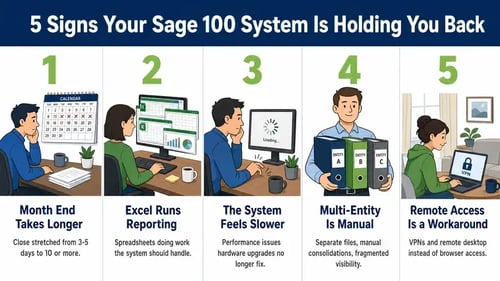
Over time, Excel often becomes essential to financial reporting. Spreadsheets are used for consolidations, budget comparisons, job or project profitability, inventory analysis, and executive reporting.
Excel is not the problem. It is a powerful tool and always will be.
The challenge begins when Excel becomes the primary place where critical financial insight lives because Sage 100 cannot easily provide it. Data gets exported, adjusted, reconciled, and spread across multiple versions of the same file.
As the business grows, more people need answers faster. Leadership wants to move from summary to detail without waiting for someone to export, rebuild, or verify a report.
When spreadsheets become necessary to produce and explain the numbers, rather than simply analyze them, the reporting process may have outgrown the system behind it.
Many companies notice that Sage 100 does not run as quickly as it once did. Reports take longer. Data entry slows during busy periods. Month-end work gets pushed into evenings or weekends.
Hardware upgrades may help temporarily, but each improvement tends to deliver less benefit over time.
As databases grow and transaction volumes increase, maintaining consistent performance can become more difficult. At a certain point, the issue is no longer just hardware, maintenance, or system tuning. The platform is being asked to handle more than it was originally designed to support.
This is not a maintenance issue. It is a sign the business has outgrown what the system was built to handle.
As businesses grow, complexity follows. New locations are added. Additional legal entities are created. Acquisitions introduce new structures. Departments begin operating as their own profit centers.
In Sage 100, this often means separate company files, manual intercompany work, and consolidations performed outside the system. Enterprise-wide visibility becomes delayed and fragmented.
The challenge is not simply having more entities or locations. It is the amount of manual work required to keep them connected, reconcile activity, and produce a complete view of the business.
When multi-entity and multi-location reporting depends on spreadsheets, exports, and manual consolidation, finance teams are left stitching the organization together after the fact.
Remote and mobile access are now standard expectations. Teams work from home, in the field, and across multiple locations. Leaders want access to dashboards and reports without being tied to the office.
With Sage 100, remote access often depends on VPNs, remote desktop tools, or hosted environments. Performance can be inconsistent, and the experience may vary depending on the device, connection, or location.
Hosting can improve accessibility, but it does not change how the system was originally designed to be used. Remote access still feels like an extra layer rather than a natural part of the platform.
When employees need workarounds just to access the system outside the office, it is a sign the technology no longer matches the way the business operates.
When Sage 100 was originally developed, businesses typically operated from central offices, relied on periodic reporting, and managed much of their technology infrastructure internally.
Today, businesses expect distributed access, real-time visibility, multi-entity reporting, and cloud platforms that reduce the burden on internal IT teams.
The gap is not about good software or bad software. It reflects decades of change in how businesses operate and what they need from their financial systems.
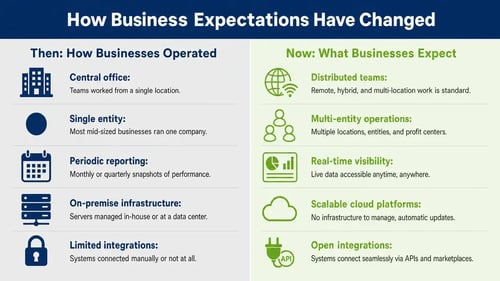
For some organizations, staying on Sage 100 still makes sense, particularly when growth is limited and current processes remain manageable. The tradeoff may be more maintenance, added infrastructure complexity, and slower access to new capabilities over time.
Others use this point to reassess what kind of system best supports the way the business operates today. That may mean evaluating a modern financial management system or a full cloud ERP platform with real-time reporting, remote access, and broader operational visibility.
The right path depends on where the business is headed, not just where it has been.
For a closer look at the differences, see our Sage 100 vs. Acumatica comparison.
Milestone Information Solutions works with companies that are still using Sage 100 and are unsure whether it makes more sense to improve the system they have or begin planning a move to the cloud.
Milestone helps document current pain points, review how Sage 100 is being used today, and compare practical options. That may include staying on Sage 100 or evaluating a modern cloud ERP platform such as Acumatica.
For companies further along in the evaluation process, our Sage 100 migration guide explains what a move typically involves.
We help leadership understand the tradeoffs, costs, and timing behind each option so the business can make a well-informed decision about the right path forward.

Compare Sage 100 vs Acumatica across cloud access, reporting, integrations, licensing, scalability, and day-to-day use to see which ERP fits your...

SaaS ERP, also called cloud ERP, reduces costs, improves visibility, and scales with your business. Learn what makes it the new standard for modern...
Compare ERP and WMS, see how standalone and integrated systems differ, and learn when an ERP WMS may be the better fit for your warehouse.