ACUMATICA CLOUD ERP GUIDE
Acumatica Cloud ERP
Software Guide
Everything you need to know about Acumatica: modules, pricing, implementation, and industry editions.
Whether you are evaluating ERP for the first time or comparing Acumatica to other solutions, this guide gives you a clear, straightforward look at Acumatica Cloud ERP in one place.
Acumatica is the software.
Milestone Information Solutions makes it work for your business.
The Platform
What is Acumatica?
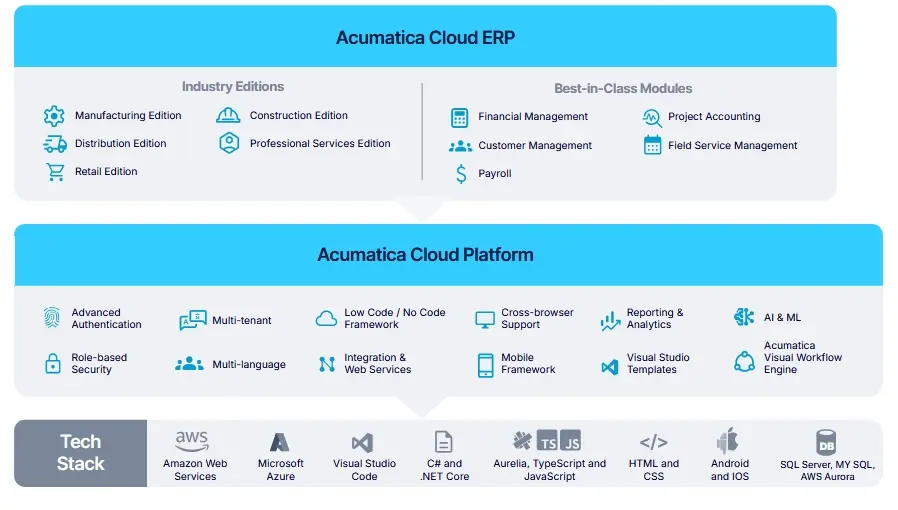
Acumatica is a modern cloud-based business management software, also known as ERP (Enterprise Resource Planning). It helps small and mid-market companies manage all their important work in one place. With modern cloud technology, you can access your business anytime and anywhere.
Acumatica connects finances, inventory, warehouse operations, projects, and customer relationships in one platform, giving your team a shared view of the business.
Modules & Features
Key Acumatica Software Modules and Features
Acumatica offers a wide range of modules that cover the core areas of your business.
Manage your general ledger, payables, receivables, cash, and reconciliations.
Inventory & Order Management →
Track inventory, streamline orders, and improve warehouse accuracy.
Project Accounting & Management →
Track project costs, budgets, billing, and resources.
Manage leads, customer data, sales, and support.
Explore solutions for your industry.
Additional powerful tools include:
Industry Editions
Industry-Specific Solutions
Acumatica ERP software offers tailored industry editions with built-in features and compliance tools, plus the flexibility to customize workflows so the system fits your business.
Manufacturing Edition
- Production and materials management
- Support for make-to-stock, make-to-order, engineer-to-order, and batch production
Distribution Edition
- Inventory and warehouse management
- Automated order management for sales and purchasing
Construction Edition
- Job costing and project management
- Change order tracking, progress billing, and compliance features
Retail-Commerce Edition
- Omnichannel sales with eCommerce integrations (Shopify, Magento, BigCommerce)
- Inventory and fulfillment automation
Professional Services Edition
- Advanced project accounting
- Time and expense tracking
General Business Edition
- Core financials (GL, AP/AR, cash management)
- Multi-entity and multi-currency support
Pricing Model
Acumatica Cloud ERP Pricing
Acumatica pricing can vary based on factors such as:
FACTOR 01
Resources
FACTOR 02
Modules
FACTOR 03
Integrations
Unlimited Users
Select, Prime, and Enterprise editions support unlimited users.
Explore pricing factors and licensing considerations in our detailed Acumatica pricing guide.
Implementation
Acumatica Implementation Journey
Your Acumatica partner guides planning, system setup, data preparation, and launch, with ongoing support as your business evolves.
Planning & System Setup
Define your goals, map key workflows, and configure Acumatica around your business.
Data Migration
Prepare, clean, and test your business data before transferring it into Acumatica.
Training & Go-Live
Train your team, test key processes, and complete final checks before launch.
Ongoing Support
Get help after launch and refine the system as your needs change.
ERP Readiness
Planning an ERP Implementation?
Before you start, our ERP Implementation Readiness Assessment walks through 10 questions about your goals, team, and processes.
Why Acumatica
Why Choose Acumatica Cloud ERP?
Most cloud ERP systems can check the feature boxes. The difference is how easy they are to use, maintain, and scale as your business changes. Acumatica provides a modern cloud ERP platform without many of the limitations that come with traditional ERP systems.
Cloud-Based & Flexible
Run Acumatica as a SaaS solution on AWS (most popular deployment option) or in a private cloud environment.
Unlimited Users
Select, Prime, and Enterprise editions support unlimited users, making it easier to give your team access to the information they need. (See Pricing for details.)
Access From Anywhere
View reports, approve transactions, and manage operations from any device.
Built-In Security Controls
Data encryption, multi-factor authentication, and role-based permissions help protect sensitive business information.
Regular Product Updates
New features, automation tools, and AI capabilities are added through ongoing updates.
Flexible and Adaptable
Customize workflows, reports, dashboards, and integrations to fit the way your business operates.
Training & Support
Educational Resources and Support
An Acumatica implementation partner like Milestone Information Solutions is your main resource and support layer. Because your partner helped configure the system around your business, they understand how your team uses Acumatica day to day.
Acumatica also provides additional learning resources, including Acumatica University training videos and courses, user guides, a searchable knowledge base, and an active user community.
Milestone provides:
- Hands-on training from experts who understand your business and your team.
- Custom documentation and guidance based on how your team uses Acumatica.
- Ongoing partner support from the same Acumatica experts who guided your implementation.
Helpful Resources
Implementation, training, and support
Training materials and product documentation
The active user community
Long-Term Fit
Scalability and Partnership
Acumatica is designed to adapt as your business changes, while your implementation partner can continue helping you get more from the system over time.
Flexible as Your Business Changes
Add functionality, adjust workflows, and connect new systems as requirements change.
Ongoing Product Updates
Acumatica continues to add product improvements and new capabilities through regular releases.
Long-Term Partner Support
Milestone Information Solutions can continue supporting and improving your Acumatica system as your needs change.
Acumatica Customer Bill of Rights
Acumatica’s Customer Bill of Rights sets out ten commitments to its customers. Customers have the right to:
2026 R2 Highlights
Acumatica in 2026: What’s New
Acumatica 2026 R2 introduces updates to AI, reporting, the user experience, and industry-specific workflows.
AI & Automation
Reporting & User Experience
Industry Enhancements
Source: Acumatica 2026 R2 release highlights (opens in a new tab)
Schedule a discovery call to talk through what these updates could mean for your business.
Schedule a Discovery CallFAQ
Acumatica Frequently Asked Questions
Have more questions? Here are answers to some of the most common questions businesses ask when evaluating Acumatica Cloud ERP.
-
Is Acumatica a good fit for my business?
Acumatica is a strong fit for small and midsize businesses that need better visibility, connected workflows, and a system that can support changing requirements. It is often a good next step for companies moving beyond entry-level accounting software or legacy systems that rely heavily on spreadsheets and manual processes.
Acumatica works particularly well for:
- Construction companies needing job costing, project financials, and field-to-office visibility
- Distributors managing inventory, purchasing, fulfillment, and multiple locations
- Manufacturers managing production, scheduling, material planning, and inventory
- Businesses focused on better financial reporting, controls, and operational visibility
- Service and project-based organizations needing project accounting, billing, and resource management
If you are unsure whether Acumatica is the right fit, a discovery conversation and customized demo can help you evaluate it against your business requirements.
-
What does a typical Acumatica implementation timeline look like?
An Acumatica implementation can take about 3–6 months, depending on the modules selected, data migration, integrations, and overall project scope. Larger organizations or projects involving multiple entities, more complex workflows, significant integrations, or extensive data migration may take longer.
Implementation typically includes planning, system configuration, data migration, testing, training, and go-live. Some companies launch their selected modules together, while others take a phased approach and add functionality over time.
-
How hard is it to move from my current accounting or ERP system to Acumatica?
Migrating to Acumatica is usually easier than most companies expect. Businesses regularly move from QuickBooks, Sage, Microsoft Dynamics, NetSuite, Macola, and other legacy or custom-built systems.
Most migrations follow a straightforward process:
- Data review and cleanup
- Mapping your current structure to Acumatica
- Importing balances, open transactions, and agreed historical data
- Validating financials and key reports
- Training your accounting and operations teams
You continue working in your current system while the new Acumatica environment is configured and your data migration is prepared and tested, helping minimize disruption to day-to-day operations.
Migration complexity typically depends on the amount and quality of your data, the integrations involved, and how much historical information you want to bring over. Working with an experienced Acumatica implementation partner helps you configure your financial structure, reporting, and business processes correctly from the start.
-
When Should a Business Move From QuickBooks to Acumatica?
Many businesses start looking at Acumatica when their requirements begin to extend beyond how they are using QuickBooks. As transaction volume grows, reporting needs change, and more departments need access to information, companies may start relying more heavily on spreadsheets, manual processes, and separate systems.
Common signs it may be time to evaluate ERP include:
- Managing multiple entities, locations, or warehouses
- Relying heavily on spreadsheets for reporting and analysis
- Needing better visibility across inventory, projects, or operations
- Increasing requirements around financial controls and auditability
- Looking for more automation across accounting and operational processes
Acumatica connects financials, inventory, projects, operations, and reporting in one platform, giving businesses greater visibility and stronger controls as requirements change. If several of these challenges sound familiar, our guide on outgrowing QuickBooks provides a deeper look at when companies typically start evaluating ERP software.
-
Why do I need an Acumatica partner?
Acumatica uses a partner-led sales and implementation model, working through value-added resellers and implementation partners rather than handling implementations directly. This allows Acumatica to focus on research, development, and product improvements, while partners help customers evaluate, implement, and support the system.
Your Acumatica partner works with you to understand your requirements, configure the system, migrate data, test workflows, train your team, and support go-live. Because your partner understands how your system is configured, they can also help with ongoing support, reporting changes, integrations, and additional functionality as your needs evolve.
A partner like Milestone Information Solutions brings ERP experience, Acumatica product knowledge, and industry understanding to help configure the system around how your business operates.