Acumatica Pricing Made Simple
Understand your costs, choose the right fit, and plan with confidence.
Acumatica pricing depends on your industry edition, selected applications, and system usage. This guide explains software starting prices, implementation costs, and what to consider when evaluating whether Acumatica fits your business.
Acumatica is the software. Milestone Information Solutions makes it work for you.
How Acumatica Pricing Works
Acumatica pricing depends on the functionality, capacity, and deployment option your business needs. This page provides general pricing guidance to help you understand the potential investment before beginning an evaluation. The first step is determining whether Acumatica fits your business.
Subscription Licensing Overview
Two Subscription options to consider are:
- SaaS Subscription – The most popular option. Includes ERP software, hosting, security, backups, and system maintenance in one predictable fee.
- Private Cloud Subscription (PCS) – An alternative for businesses that want to host and manage Acumatica in their own environment.
What Determines Your Acumatica Cost
Your subscription cost depends on several factors, including:
- Edition Level
Essentials, Select, Prime, and Enterprise offer different capacity and licensing options. The appropriate level depends on your requirements, expected usage, and plans for growth.
- Industry Edition
Built-in functionality designed for construction, distribution, manufacturing, professional services, or general business — so you only pay for tools you’ll actually use. - Usage Tier (CTV)
Your usage tier is based on transaction volume, making it straightforward to determine from your business activity. Start with the capacity you need today, with room to increase it as your business grows.
- Additional Functionality
Choose the modules that support your operations, with options such as Fixed Assets, Expense Management, and CRM available if needed. You can add functionality over time without taking on everything upfront.
Scalability
Acumatica grows with your business. Add modules, increase capacity, or move to a higher edition as your operations evolve, all while staying on the same core ERP platform.
Acumatica Edition Levels
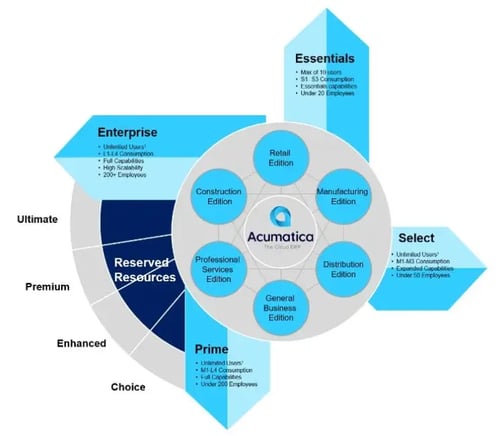
Acumatica offers four edition levels designed to accommodate different business requirements, from smaller organizations getting started with ERP to larger companies with more advanced needs.
All editions run on the same Acumatica platform, giving businesses a path to move to a higher level as their requirements change.
Essentials
Best for: Smaller organizations that need core Acumatica ERP functionality and have a limited number of users.
Licensing: Supports a small number of named users, with a clear upgrade path to unlimited users as your business grows.
Benefit: Provides an entry-level path into Acumatica with the flexibility to move to a higher edition as your requirements change.
Select
Best for: Small businesses that need unlimited user access and greater system capacity to support broader use of Acumatica across the business.
Licensing: Unlimited users.
Benefit: Expands access across the organization so more employees can work in Acumatica without adding per-user licensing costs.
Prime
Best for: Lower mid-market businesses with greater ERP and system requirements.
Licensing: Unlimited users.
Benefit: Provides additional system capacity to support higher usage and more demanding business requirements.
Enterprise
Best for: Larger organizations with higher overall ERP and system requirements.
Licensing: Unlimited users.
Benefit: Provides greater system capacity to support larger workloads and more demanding business needs.
[Explore Acumatica with Milestone for Your Business →]
Talk with Milestone about your requirements, and we will help determine which Acumatica edition best fits your business.
Acumatica Industry Editions
Acumatica starts with the same core platform, then adds industry-specific applications based on how your business operates. This allows you to build the system around the functionality your business actually needs.
🏗 Construction
For contractors, builders, and specialty trades. Supports project accounting and job costing, subcontract management, change orders, compliance tracking, and mobile tools for field teams.
Keep project and financial information connected from job cost and commitments through billing, compliance, accounting, and the field.
Learn more about Acumatica for Construction →
📦 Distribution
For wholesale distributors and inventory-focused businesses. Supports inventory management, purchasing, sales orders, warehouse management, and order fulfillment.
Connect purchasing, inventory, warehouse activity, and fulfillment for better visibility across your operation.
Learn more about Acumatica for Distribution →
⚙ Manufacturing
For make-to-stock, make-to-order, engineer-to-order, and other manufacturing environments. Supports bills of material, MRP, production management, scheduling, and shop floor data collection.
Connect material planning, production, inventory, and financials so what happens on the shop floor is reflected throughout the business.
Learn more about Acumatica for Manufacturing →
👔 Professional Services
For consulting, engineering, IT, advertising, and other project-based firms. Supports project accounting, resource planning, time and expense management, billing, and financial reporting.
Connect project activity, time, costs, billing, and financials to get a clearer view of utilization and project profitability.
📊 General Business
For businesses that do not need a specialized industry edition. Supports financial management and reporting, with CRM, project accounting, and other applications available based on your requirements.
Start with the applications your business needs and add additional functionality as your requirements change.
Learn more about Acumatica for General Business →
Your industry edition helps determine the applications and industry-specific functionality included in your Acumatica solution and plays a role in your overall subscription cost.
Acumatica Pricing by Edition
For Construction, Distribution, and Professional Services, and General Business:
-
Essentials: Starts around $7K per year and is limited to 10 named users.
-
Select: Starts at $23K per year – Unlimited users
-
Prime: Starts at $30K per year – Unlimited users
-
Enterprise: Contact for detailed pricing – Unlimited users
Starting software prices may vary by industry edition and business requirements.
Manufacturing Edition:
-
Essentials: Starts at $25K/year – Limited to 10 named users
-
Select: Starts at $50K/year – Unlimited users
-
Prime: Starts at $60K/year – Unlimited users
-
Enterprise: Contact for detailed pricing – Unlimited users
Only Essentials has a user limit. All other editions allow unlimited users without additional per-user license fees.
Note: These figures are starting software prices. A discovery conversation helps clarify costs based on your usage tier, industry edition, and required modules. Implementation is separate.
Acumatica Implementation Costs
Your Acumatica subscription covers the software. Implementation is the one-time process of configuring Acumatica for your business, migrating your data, integrating key applications, and preparing your team to use the system successfully.
Implementation is a separate, one-time investment. A common budgeting guideline is to plan for implementation costs of approximately 1.5× to 2× your first-year Acumatica software subscription.
Actual costs depend on project scope, data migration, integrations, reporting, training, customization, and the work your internal team handles.
What’s Typically Included
- System configuration aligned to your workflows
- Data migration from legacy or entry- level systems
- Integration setup with other applications
- Dashboard and report configuration
- User training, testing, and go-live support
Working with Milestone Information Solutions helps ensure your implementation plan aligns with your operational goals, budget, internal resources, and timeline.
Typical Implementation Ranges
- Small business: $25K–$50K
- Mid-market: $50K–$100K
- Complex / multi-site: $100K+
Please note: These ranges are for budget planning only. Final implementation pricing is based on your project scope, data, integrations, training, and internal responsibilities.
Contact Milestone Information Solutions for a clear, customized Acumatica pricing estimate.
Is Acumatica Right for Your Business?
Pricing gives you a starting point, but the first question is whether Acumatica can support the way your business works. Before getting into detailed costs, it helps to understand what you need from a new system.
Identify What Is Driving the Change
What is becoming harder to manage with your current software? Think about reporting delays, disconnected systems, manual work, or processes your team has outgrown.
Specific examples help make the evaluation more useful.
Know What Needs to Work
Think about the daily processes your team depends on and what a new system needs to support.
You do not need a complete requirements list before starting. The goal is to have enough context to determine whether Acumatica is a good fit.
Think About the Systems You Rely On
Make a simple list of the applications your business uses and which ones you may need to keep.
This helps guide early conversations about integrations and how Acumatica would fit into your existing operation.
Use Pricing as a Planning Guideline
The pricing information on this page can help you understand the potential investment. Your actual scope and costs become clearer as you identify the functionality you need and work through implementation requirements.
Start With a Conversation About Fit
Tell us about your current system, what is getting in the way, and what you need to do differently.
Milestone can help you determine whether Acumatica makes sense for your business and what the next steps should look like.
Talk with Milestone about whether Acumatica is right for your business
-
How does Acumatica pricing work compared to traditional ERP pricing?
Acumatica takes a different approach from ERP systems that charge primarily by the number of users. With consumption-based licensing, businesses can give more employees access to the system without adding a license cost for each user.
Pricing is based on the applications you need, expected system usage, and resource requirements.
Key differences include:
- Unlimited users with consumption-based licensing
- Pricing based on applications and system usage rather than user count
- Broader access across finance, operations, management, and other teams
- Costs that scale with business requirements rather than headcount alone
This allows businesses to expand access to Acumatica without automatically increasing software costs every time another employee needs to use the system.
-
Does Acumatica charge per user?
Acumatica does not use traditional per-user pricing for most editions. With consumption-based licensing, Select, Prime, and Enterprise support unlimited users, allowing businesses to give more employees access without adding a license cost for each user.
The Essentials edition, designed for smaller organizations, includes 5 named users and can be increased to 10.
How user access works in Acumatica:
- Unlimited users are available with consumption-based licensing
- Pricing is based on the applications you need, expected usage, and system resources rather than user count
- Finance, operations, management, and other teams can have access without adding a separate license for every user
This makes it easier to expand access to Acumatica as more people across the business need to use the system.
-
What determines my Acumatica subscription cost?
Acumatica subscription pricing is based on the applications your business needs, expected system usage and resource requirements, and how the system is deployed.
The primary factors that influence your Acumatica subscription cost include:
- The applications and functionality you need
- Expected transaction volume and system usage
- System resources and data storage requirements
- Your Acumatica edition and industry configuration
- Deployment option, such as SaaS or private cloud
Because Acumatica pricing is tailored to each business, Milestone Information Solutions will help size the system based on your requirements and provide a customized subscription estimate.
-
Can I start small with Acumatica and upgrade later as we grow?
Yes. Acumatica is designed to let businesses start with what they need today and expand over time by adding modules, features, and capacity as operations become more complex. Because Acumatica pricing is based on system usage and enabled functionality, businesses are not locked into a rigid package or forced to purchase everything upfront.
How Acumatica supports growth over time:
-
Start with core financials and essential operational features
-
Add industry-specific modules as needs evolve
-
Expand inventory, project, manufacturing, or reporting capabilities when required
-
Increase system usage as transaction volume and activity grow
-
Avoid re-implementing or switching systems as the business scales
This flexible approach helps businesses align ERP investment with growth while keeping data, processes, and financials connected on a single platform.
-
-
How does Acumatica pricing compare to other ERP systems?
Acumatica pricing is widely viewed as competitive with other mid-market ERP systems, especially over the long term. Unlike per-user ERP models that become more expensive as teams grow, Acumatica’s pricing is based on system usage and functionality, allowing businesses to expand access without continually increasing license costs.
Many organizations see value in Acumatica’s combination of a modern cloud ERP platform, unlimited users, and industry-specific functionality in a single system.
Why businesses view Acumatica as cost-competitive:
-
No per-user licensing in core editions
-
Pricing scales with usage rather than headcount
-
Industry-specific editions reduce the need for third-party systems
-
Built-in reporting and automation lower long-term costs
-
A single platform reduces data silos and manual work
When evaluated over multiple years, Acumatica’s pricing structure helps many growing businesses control total cost of ownership while supporting increasing operational complexity.
-
-
Can Acumatica be used for financials only?
Yes. Acumatica is commonly implemented as a financials-only system when operational modules are not required. Companies can deploy Acumatica for general ledger, accounts payable, accounts receivable, cash management, and financial reporting without adding modules such as inventory, projects, or manufacturing.
This approach is common for organizations that want to modernize their accounting systems without taking on additional operational complexity. If needs change over time, other applications can be added on the same platform, but there is no requirement to implement them upfront.
-
How do Acumatica usage tiers (CTV) work?
Acumatica uses a consumption-based model called CTV (Commercial Transaction Volume) to align your subscription with how much you actually use the system, not how many users you have.
How Monthly CTV is calculated
Monthly CTV is the highest transaction count from any one transaction type during your busiest month — it’s not an average and not a combined total across types.Counted transaction types
Your CTV is based on the single highest monthly volume of one of these transaction “families” (each family groups related AR and AP activity for simplicity and consistency):- Orders (Sales Orders, Purchase Orders, Purchase Receipts)
- Invoices (AR Invoices, AP Invoices)
- Payments (Customer Payments, AP Payments)
- Shipments
Example
In one month, Company A processed:- 720 AR Invoices
- 650 Customer Payments
- 500 AP Invoices
- 250 AP Payments
- 480 Sales Orders
The highest count is 720 AR Invoices, so their Monthly CTV is 720. That CTV value places them into the appropriate usage tier (for example, S1) on Acumatica’s pricing grid.
Why it matters
Acumatica ties pricing to usage instead of headcount, and all editions above Essentials include unlimited users — your cost is driven by transaction volume, while Essentials offers a lower-cost entry point with a capped number of named users.