Outgrown Sage 100? 5 Signs It May Be Time for a Change
If managing Sage 100 has gotten harder over time, these five signs may explain why your business has outgrown the system and what to do next.
7 min read
Updated: July 2026
This Sage 100 vs. Acumatica comparison looks at how each system works in day-to-day use rather than relying on feature lists. Both platforms support core accounting, inventory, and operational workflows for small and mid-sized organizations, but they approach cloud architecture, scalability, access, and integration very differently.
Where Sage 100 and Acumatica begin to differ is in how information moves through the business, how easily people can get the answers they need, and how much manual effort is required to keep reporting accurate as complexity increases.
Sage 100 and Acumatica were built in different eras and around different ideas of how ERP software should work. Those origins still affect how each system handles access, reporting, scalability, and day-to-day use.
Sage 100 traces its roots back to MAS 90, originally developed by State of the Art in the mid-1980s and later acquired by The Sage Group, a global software company headquartered in the United Kingdom with U.S. operations based in Atlanta, Georgia. The system was built for office-based teams, on-premise servers, and periodic reporting cycles.
That foundation explains why Sage 100 feels familiar and stable, and it has supported many businesses well for decades. Over time, Sage 100 evolved and can now be hosted in the cloud, improving accessibility and reducing the need for on-site infrastructure.
However, even when Sage 100 is hosted in the cloud, it still relies on the proprietary ProvideX file-based database. Because of that, the core structure and scalability remain tied to older architecture rather than a modern cloud platform.
Those original design decisions continue to influence how Sage 100 performs in day-to-day use.
Acumatica was founded in 2008 and is headquartered in Bellevue, Washington, as a cloud-native ERP platform. It was built to run in a web browser and provide shared access to financial and operational data without relying on on-premise servers or remote desktop tools.
From the start, Acumatica was designed for organizations with multiple users, locations, and departments working in the system throughout the day. Reporting, inquiries, and dashboards update as transactions are entered, and access is managed through role-based security rather than limiting who can log in.
Those design choices continue to shape how Acumatica behaves in everyday use, especially when it comes to access, reporting, and visibility as organizations grow.
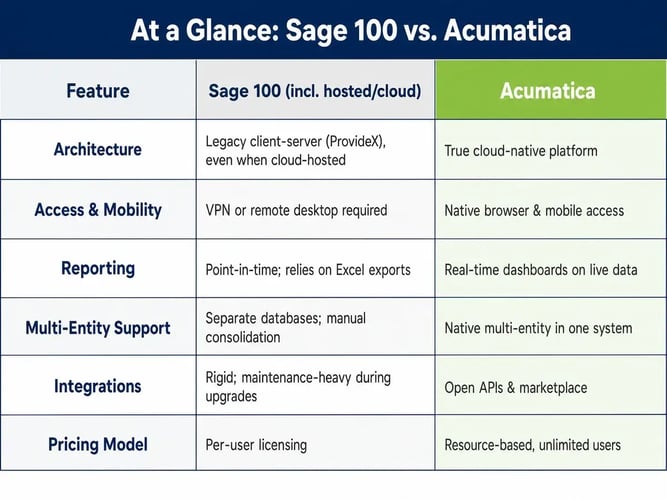
The biggest differences between Sage 100 and Acumatica often show up in everyday work. Both systems can support core accounting and operations, but they give users access to information in very different ways.
In Sage 100 environments:
Sage 100 works best when processes are stable, the user base is controlled, and periodic reporting cycles are acceptable.
In Acumatica environments:
The difference isn't the accounting logic. It's how quickly people can get clear, trustworthy answers during the workday.
One of the most noticeable differences between Sage 100 and Acumatica is how easily users can move from summary information into the details behind it.
In Sage 100, answering follow-up questions often means running additional reports, exporting data, or asking finance to help investigate. Drill-down capabilities exist, but they tend to be less fluid across modules, entities, and locations.
In Acumatica, dashboards, inquiries, and reports let users move directly into transaction-level detail. A high-level margin number can be traced back to specific orders, costs, or activities without leaving the system or rebuilding the report.
This reduces the back-and-forth and makes it easier for users to get clear answers with confidence.
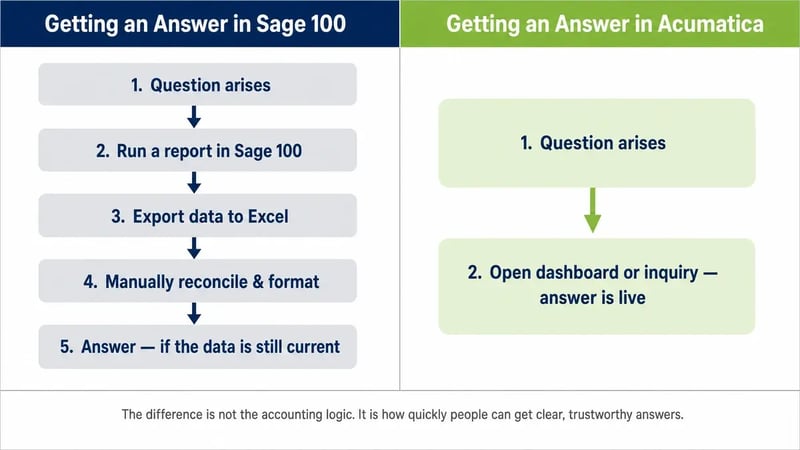
Both systems can produce the financial and operational reports businesses need. The difference is how current that information is, how easily teams can access it, and how much work happens outside the ERP to turn data into something useful.
Reporting in Sage 100 is dependable and familiar, but it is often point-in-time. Many organizations export data to Excel or other tools for trend analysis, consolidation, and deeper reporting. As data and reporting needs grow, maintaining and validating those reports can become part of everyday work.
Acumatica uses real-time inquiries, dashboards, and reports built directly on current transaction data. Finance and operations teams work from the same information, which reduces the time spent validating numbers and reconciling different versions of reports.
As reporting needs change, teams can add new views, inquiries, and dashboards inside the system instead of managing more reports outside of it.
The difference is not whether Sage 100 and Acumatica can connect with other systems. Both can. The bigger question is how much effort those connections take to maintain as the business, software, and reporting needs change.
Most businesses rely on more than just their ERP. CRM systems, eCommerce platforms, shipping tools, payroll, and industry-specific applications all need to connect cleanly to core financial data.
In Sage 100, integrations and customizations are possible, but they are often more rigid and require additional effort to maintain as systems change or upgrades occur. Connecting to newer cloud tools can introduce added complexity, and version upgrades may require hands-on work to confirm customizations and integrations continue working as expected.
Acumatica was built to be flexible. In addition to Acumatica’s built-in modules, its open APIs and marketplace make it easier to connect with tax, shipping, eCommerce, payroll, document management, and other industry-specific applications as business needs change. Because Acumatica is cloud-based, updates are delivered regularly without the same type of traditional version upgrade project.
Over time, teams can spend less time maintaining integrations and managing upgrades and more time using the information those systems provide.
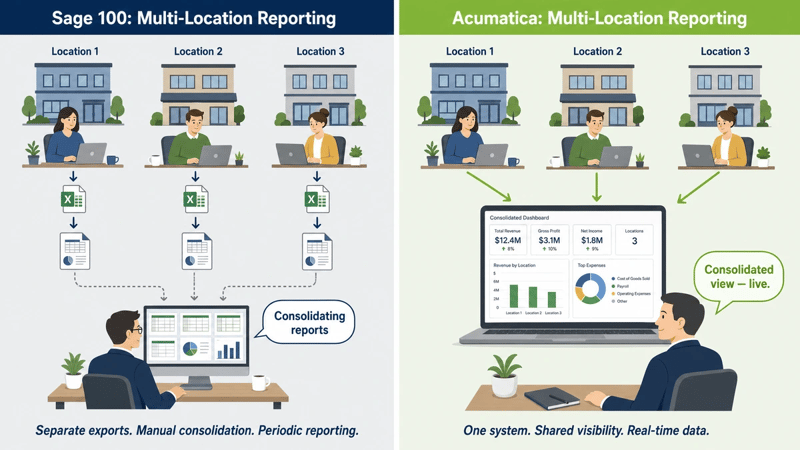
These differences become more pronounced in multi-entity or multi-location environments. As organizations add companies, locations, or reporting layers, Sage 100 often relies on additional reporting effort and manual consolidation across separate company databases.
By contrast, Acumatica is designed to provide shared visibility across entities within a single system. Financial data, inventory, and operational activity can be viewed across companies without building separate databases or stitching reports together.
As complexity increases, this reduces reconciliation work and makes it easier for leadership and finance to operate from one consistent set of numbers.
Consider a distribution company with three locations that needs a consolidated view of inventory and margins.
In Sage 100, this often means pulling separate reports from each location, exporting the data to Excel, and manually combining the results. If leadership wants to review a specific SKU across locations, additional reporting and reconciliation may be needed.
In Acumatica, multi-location visibility is built into the system. A buyer can see inventory across all locations in one dashboard and drill into transaction details. Finance can review consolidated margins as orders ship instead of waiting until month-end reports are assembled.
Both systems can track the same information. The difference is how much manual work sits between the question and the answer.
Despite their differences, Sage 100 and Acumatica both support:
Neither system replaces disciplined financial management or sound operational processes.
The real difference is not whether either system can post a journal entry or produce a trial balance. It is how much effort it takes to keep reporting accurate, give the right people access to information, and adapt as the business changes.
Comparing Sage 100 and Acumatica is less about features and more about how each system supports everyday work. Sage 100 was designed in an era centered on office-based systems and controlled access to information. Acumatica was built for the cloud, where shared access and real-time visibility across the organization are the norm.
Those different starting points still shape how each platform feels, how information flows, and how easily organizations can work with their data as the business becomes more complex.
Sage 100 may continue to be the right fit for businesses with stable processes and manageable reporting needs. Acumatica is usually the stronger option when more people need access, reporting is becoming harder to maintain, or the business needs a modern ERP platform that connects finance and operations in one system.
Milestone Information Solutions has worked with Sage 100 since 1996 and has been an Acumatica partner for more than a decade. That experience gives us a practical understanding of how the two systems compare, where businesses begin to outgrow Sage 100, and what it takes to successfully move to a modern ERP platform.
If you're comparing Sage 100 and Acumatica and want to talk through your current system, reporting needs, and long-term goals, we'd be happy to have a conversation.

If managing Sage 100 has gotten harder over time, these five signs may explain why your business has outgrown the system and what to do next.

Compare QuickBooks and Acumatica to see when it's time to move from accounting software to a cloud ERP built for reporting, controls, and operations.

What construction finance leaders ask before choosing an ERP. Milestone IS covers the seven questions — job costing, implementation, and ROI.