Construction Inventory Management Software: Control Materials & Costs
See how construction inventory management software helps contractors track materials, improve job costing, and give finance numbers they can trust.
6 min read

Most companies do not start comparing Acumatica vs QuickBooks because QuickBooks stopped working. They start comparing them because the business changed.
QuickBooks works well for many small and growing companies, especially when financial needs are relatively straightforward. But as operations become more complex, businesses often start looking for better visibility into inventory, reporting, cash flow, and how operations connect back to financial performance.
This article looks at the key differences between QuickBooks and Acumatica, when each system makes sense, and what usually drives the move from accounting software to ERP.
QuickBooks is accounting software first. It is designed to handle core financial functions like the general ledger, accounts payable and receivable, basic inventory, and payroll. For simpler operations, that is often exactly what is needed, and for many businesses it works well for years.
QuickBooks fits best when accounting is primarily focused on closing the books, producing standard reports, and keeping day-to-day financials moving without a lot of operational complexity.
Acumatica is built differently. As a cloud ERP, financials, inventory, projects, CRM, and operations work together in the same system. That starts to matter when accounting and operations become more connected, and teams need visibility into what is happening across the business instead of piecing information together after the fact.
That is usually when leadership starts asking finance for more than historical reporting and expects better visibility into margins, inventory, cash flow, and overall business performance.
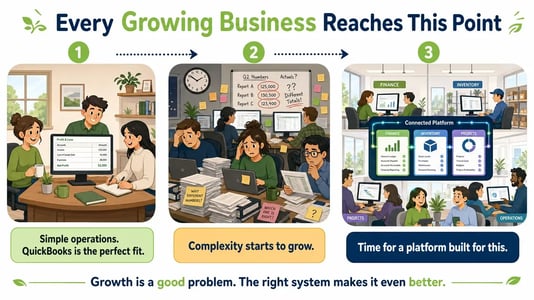
Reporting is usually the first place finance feels the shift, especially when standard financial statements are no longer enough to answer the questions leadership is asking.
QuickBooks handles standard financial statements well, but as reporting becomes more complex across entities, projects, or locations, teams often find themselves working outside the system. Consolidations move into spreadsheets, margin analysis requires exports, and multi-entity reporting starts depending on manual work or add-ons.
Over time, this shows up in familiar ways. Month-end takes longer. Different versions of the real P&L start circulating. Leadership asks a margin question and gets different answers depending on who pulls the numbers.
QuickBooks is still doing its job. It is simply being asked to support a business that has grown more complex than what it was originally designed to handle. At that point, finance teams often spend more time reconciling numbers than analyzing them, and QuickBooks can start to feel less like the system finance works in and more like the outgrowing QuickBooks.
The real difference usually shows up in day-to-day work.
In Acumatica, finance and operations work from the same system instead of piecing information together through exports, spreadsheets, or separate tools. Inventory, purchasing, sales, projects, and financials all stay connected, making it easier to understand what is happening across the business without waiting until month-end.
Finance can see not only what has already been spent, but what is already committed. That could be inventory on the way, purchases already approved, or project costs that have not yet hit an invoice. Instead of waiting weeks to understand the financial impact, teams have a clearer picture as decisions are being made.
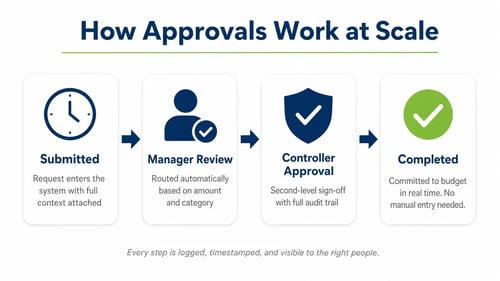
Approvals also happen inside the system rather than through email chains or manual handoffs, which helps reduce delays, improve visibility, and keep everyone working from the same information.
As businesses grow, the need for better structure around approvals, access, and audit trails usually grows with them.
QuickBooks can work well for smaller teams, but as more people get involved and processes become more complex, controls often become harder to manage. Broad user access, limited approval workflows, and manual workarounds can start creating challenges, especially across multiple entities or locations. Finance teams may also find themselves managing separate company files, manual intercompany entries, and inconsistent reporting structures.
Acumatica is built to handle more complexity. Access can be controlled by role, company, branch, or screen, and approvals happen inside the system rather than through email chains or manual follow-up. That gives finance a clearer picture of who approved what, what changed, and when it happened without slowing operations down.
Most people think scalability is about company size, but in practice it usually comes down to complexity.
QuickBooks Enterprise can support more users and more transactions, but the way the system works stays mostly the same. As businesses add entities, locations, inventory, or more operational processes, spreadsheets and add-ons often start growing alongside them, creating more manual work instead of less.
Acumatica is built differently. Multiple companies, branches, locations, and currencies can work together in one system, with intercompany accounting and consolidated reporting built in. Inventory, purchasing, projects, and financials stay connected, which means teams spend less time moving information between systems and more time understanding what is happening across the business.
Moving from QuickBooks to ERP is not simply moving to a larger accounting system. The bigger change is that more of the business can connect back to finance.
Inventory, purchasing, projects, approvals, multiple companies, and operational reporting can work from the same underlying system instead of being managed across separate tools and spreadsheets.
The goal is not to add more software. It is to reduce the manual work required to keep financial and operational information aligned. That is often the point where common QuickBooks limitations become easier to see.
QuickBooks remains a strong choice when operations are relatively straightforward, reporting needs are modest, and the finance team can manage some manual work along the way.
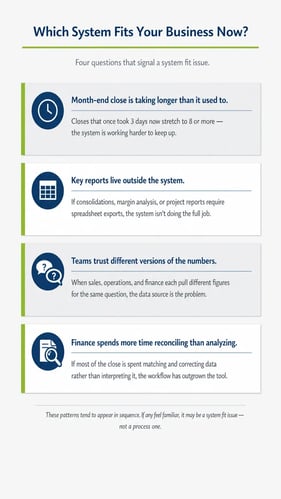
Acumatica usually enters the conversation when month-end starts taking longer, key reports move outside the system, entities or locations increase, and finance is being asked to provide faster answers to more people across the business.
At that point, the question is rarely about which system is better. It is about which one better fits how the business operates today.
For some companies, QuickBooks may still be the right fit for where they are. For others, growth starts creating more moving pieces than the current system can comfortably support. That is usually when businesses begin looking for a platform that brings financials, operations, inventory, and reporting together in one place.
Sometimes a few simple questions make the picture a lot clearer.
If those patterns feel familiar, we covered them in more detail in our article on 7 signs your business is outgrowing QuickBooks.
When these issues start showing up together, it is usually less about process and more about whether the current system still fits how the business operates.
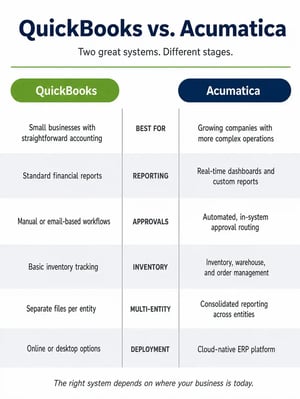
QuickBooks and Acumatica are built for different stages of business complexity.
QuickBooks works well when accounting is straightforward and the business can still manage reporting, approvals, basic inventory, and operations without too much manual work.
Acumatica starts to make more sense when finance and operations need to stay connected in one system, and when the business needs clearer visibility without relying on spreadsheets, add-ons, or manual workarounds.
The decision comes down to which system aligns better with how the business runs today.
If you are comparing QuickBooks and Acumatica, Milestone can help you look at your current accounting, reporting, inventory, projects, and other requirements to determine whether it makes sense to stay with QuickBooks or start evaluating ERP.
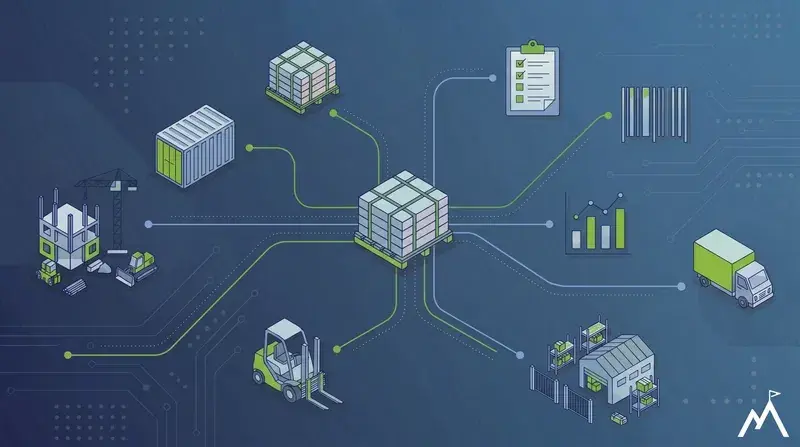
See how construction inventory management software helps contractors track materials, improve job costing, and give finance numbers they can trust.

Compare Sage 100 vs Acumatica across cloud access, reporting, integrations, licensing, scalability, and day-to-day use to see which ERP fits your...

See how Acumatica inventory management connects stock, purchasing, warehouses, costing, and financials in one cloud ERP for better visibility and...